

Universal Print for HP MFPs
Simple, Secure, Cloud-First “Anywhere” Printing.
Universal Print for HP MFPs bridges the gap — giving organizations a unified, identity-driven print management solution powered by Microsoft Universal Print, Entra ID (formerly Azure Active Directory) and native HP MFP integration.
Universal Print for HP MFPs replaces traditional unsecured printing workflows with a secure, flexible system that integrates directly with your existing Microsoft identity infrastructure.
By shifting print to a cloud-native, identity-driven model, organizations unlock immediate benefits.
This is modern printing done right: cloud-powered, identity-first, secure by design, and built for a workforce that demands simplicity. With Universal Print for HP MFPs, your print environment becomes more secure, more efficient, and far easier to manage, all while delivering a smoother experience for every user.
-
Dramatically reduce hardware, maintenance, and helpdesk overhead
-
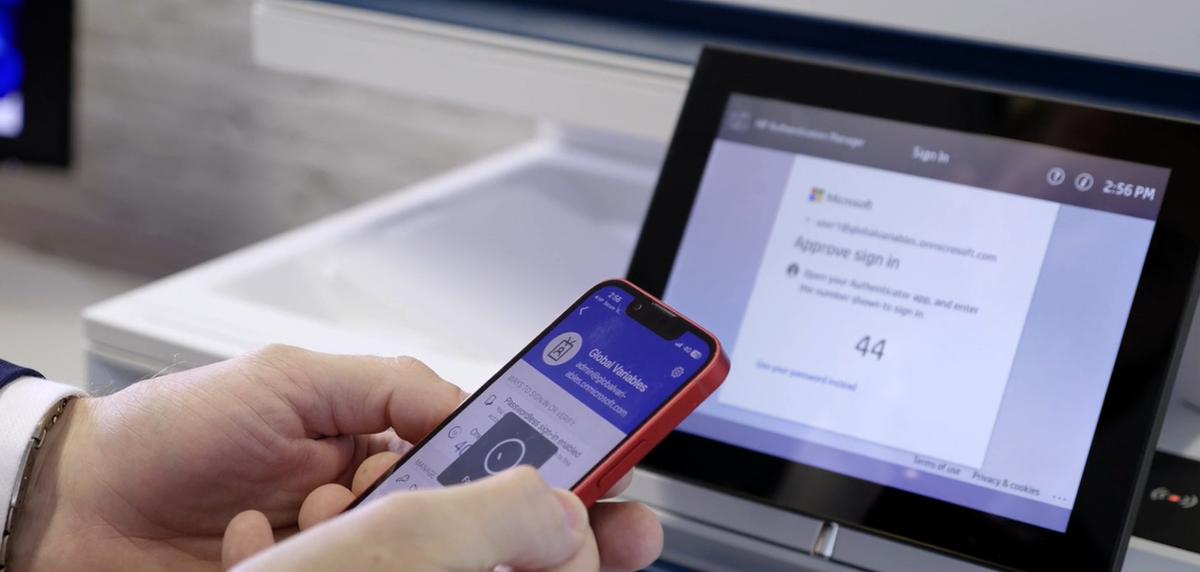
Users authenticate with smartphone, card, or QR, backed by Microsoft Entra
-
Every print job is tied to a verified identity, reducing risk and ensuring accountability
-
Users can print from anywhere and release at any authorised HP MFP
-
New users receive print access instantly based on existing Entra groups
-
Fewer tickets, fewer drivers, fewer moving parts
Talk to us about Universal Print
Why Universal Print for HP MFPs for Anywhere Printing.
Universal Print moves your print queues into Microsoft 365, Universal Print for HP MFPs extends this with identity-centric security with full HP MFP native integration.

-
Use one cloud print platform for Windows 10/11 and Microsoft 365
-
Integrate directly with HP Workpath Universal Print on HP MFPs
-
Enforce modern Entra ID authentication right at the device
-
Enable pull-print and secure release using HP Authentication Manager
-
Simplify support for hybrid work, branch offices, and MSP environments
-
Datasec’s solution is built to live entirely inside your Microsoft tenant, minimising external dependencies and keeping security, governance, and data sovereignty under your control.

How Universal Print for HP MFPs Works
-
![]()
Cloud print queues with Microsoft Universal Print
Users print from Windows or Microsoft 365 apps to a Universal Print queue—no legacy print drivers, no print servers, and no VPN dependency for remote workers.
-
![]()
HP Workpath Universal Print connector on the device
The HP Workpath Universal Print app connects HP MFPs directly to your Universal Print queues. Jobs are held in the cloud until the user authenticates at any enrolled HP device.
Key capabilities include:
Native experience on compatible HP MFPs
Browse and release jobs from Universal Print queues
Support for single “Print Anywhere” queue across multiple devices/sites
-
![]()
HP Authentication Manager for secure pull-print
HP Authentication Manager (HPAM) adds secure, policy-driven pull-print to Universal Print:
Users authenticate at the HP MFP using Microsoft Entra credentials
Session tokens are passed to authorize print release actions
Jobs are released only when the correct user is at the device
Optional passwordless experience via smartphone or card-based workflows
-
![]()
Microsoft Entra ID for identity and access control
All authentication runs through your Microsoft Entra ID tenant:
Conditional Access policies applied consistently to print
MFA enforcement where required
Group-based access to devices, queues, and print policies
Centralized audit trail inside Microsoft and Datasec reporting




“Watch Universal Print for HP MFPs in Action”
Pull-Print, Passwordless Release, & Entra-Native Security
HP Authentication Manager sits between Universal Print and the HP device to provide secure, identity-aware release:
Pull-Print / Print Anywhere printing
Users print once and release at any authorised HP MFP
Ideal for hot-desking, shared floors, and branch offices
Passwordless user experience
Use Entra-integrated factors (smartphone, PIN, or card readers)
Reduce reliance on shared or typed passwords at the device

Entra-native authorization
Leverage Entra groups and roles to determine who can print, copy, or scan
Apply policies per user, department, or location
Audit and compliance
Capture who printed what, when, and where
Support for privacy, governance, and regulatory reporting needs

Benefits for IT, Security, and End-Users
-
Consolidate print into your existing Microsoft 365 investment
Move from server-heavy print to a cloud service model
Align print with your broader cloud and zero-trust roadmap
-
Manage queues in Universal Print, not per-server
Onboard users and devices via Entra groups and Intune
Reduce troubleshooting associated with drivers and print paths
Use one set of skills and tools (Microsoft + HP) instead of multiple vendors
-
Enforce Entra-based authentication at every HP MFP
Apply Conditional Access to print workflows
Improve auditability with per-user and per-device print logs
Keep data and identities inside your own Microsoft tenant
-
Print once, release anywhere – Follow-Me printing
Shorter queues, fewer print failures
Familiar Microsoft user experience, with minimal learning curve
Increased confidence that sensitive documents don’t sit unclaimed on a tray
Where Universal Print for HP MFPs Shines
-
Secure, VPN-free print from any enrolled device
Release at the closest HP MFP, not a fixed “home queue”
-
Remove print servers in branch offices
One standard configuration rolled out via Microsoft 365
-
Financial services, government, healthcare, education
Entra-native controls, strong user verification at the device
Clear print audit trail for internal and external audits
-
Offer cloud-managed print and identity services as part of Microsoft-based managed services
Standardised, repeatable deployment patterns across customers
Admin & Infrastructure Savings
Universal Print and HP MFP integration remove whole layers of legacy print infrastructure.
No print servers to buy, patch, or maintain
Print queues are hosted in Microsoft 365
Reduce server licensing, hardware and backup requirements
Fewer drivers, fewer helpdesk tickets
Universal Print uses a universal driver model
Standardised print experience across your HP fleet
Fewer “which driver?” and “which queue?” issues for IT
Simplified deployments and moves/adds/changes
Assign print queues via Entra groups, Intune, or policy
Instant queue access for new staff based on role and location
Decommission branch print servers and legacy print appliances
Consolidated management for hybrid work
No VPN dependency for printing from remote workers
Central policy control from the Microsoft admin portal
Leverage existing monitoring and security tools in your Microsoft stack
Outcome: lower TCO for print infrastructure, less time spent on “printer admin,” and more time for strategic projects.

Why Datasec Solutions?
Datasec sits at the intersection of identity, security, and print. Our HP and Microsoft-aligned solutions are built to:
Extend Microsoft Entra ID all the way to the HP print edge
Deliver passwordless, friction-reduced access at the device
Reduce infrastructure and operational overhead
Enable partners and MSPs to build higher-value services on top of Universal Print
We work with HP, Microsoft partners, MSPs, and enterprise customers to design architectures, rollout strategies, and governance models that turn Universal Print into a strategic part of your digital workplace.
Ready to Modernise Print with
Universal Print for HP MFPs?
Contact us.
To speak to one of our representatives, please complete the form and a preferred time to talk.